Adventures in shitty security camera firmware
Published: 2024-10-15
I bought this doorbell "security" camera for $18 off Amazon to see if I could find anything fun, it was inspired by this paper which @thatguycalledsoup sent me.
I was able to dump the firmware relatively easily without even needing to solder to UART or bother with removing the SPI flash chip. The SPI flash chip was off all by itself and I was able to use a 8pin clip with a SOP8 adapter and CH341A to dump the flash.
I'd read that there could be some potential issues by using the black PCB variant of the CH341APro that's available on Amazon, because it can end up outputting 5V when it should be 3.3V due to a board design flaw, but I haven't killed any flash with it (yet).
I'd never used the CH341APro before, but it was very easy to setup on Ubuntu (basically zero effort), and what took the longest was making sure I had the clip on correctly and that the headers on the other end were in the correct pins, but once I triple and quadruple checked that I gave it a shot.
To use the CH341APro on Ubuntu I was able to just sudo apt install flashrom and create a new folder for my project
sudo apt install flashrom
mkdir ~/doorbell && cd ~/doorbell
Next, to actually dump the SPI flash, once you have flashrom installed and your CH341A plugged into your computer, and the SPI flash connected to the CH341A, it's as simple as running the command below.
sudo flashrom -V -r blob.bin -p ch341a_spi
The -V is for verbose, the -r is for read, blob.bin is the name of the file output I want, and -p is to specify the type of programmer I'm using, which in this case is ch341a_spi.
flashrom will probe for as many different SPI flash chips as it knows of, and once it finds one, it will try and read it.
In this case the flash chip is an XM25QH128C
Found XMC flash chip "XM25QH128C" (16384 kB, SPI).
It took it a couple minutes to fully dump the flash, but once it did I had a nice little blob.bin binary data file.
(The chip was a little toasty after this, so while it seemed fine running on (presumably) 5V for a couple minutes, I wouldn't over-volt it more than once or twice.)
Running file on it, all you get is that it's binary data, which was to be expected, as this is a full flash chip dump, and I would be extremely confused if the first couple blocks of memory were anything recognizable to file.
However, if you run binwalk -e -M blob.bin you will get a lot more interesting stuff (-e is "extract", and -M is recursive).
binwalk -e -M blob.bin

Scan Time:     2024-09-16 20:06:56
Target File:   /home/neko/doorbell/blob.bin
MD5 Checksum:  fb2a1b2da12cb761e9991faec9a70dbd
Signatures:    411

DECIMAL       HEXADECIMAL     DESCRIPTION
--------------------------------------------------------------------------------
23086         0x5A2E          Android bootimg, kernel size: 1919249152 bytes, kernel addr: 0x5F6C656E, ramdisk size: 1919181921 bytes, ramdisk addr: 0xA78253A, product name: "load boot_image fail"
66560         0x10400         Flattened device tree, size: 105304 bytes, version: 17
1114112       0x110000        Flattened device tree, size: 105304 bytes, version: 17
1245184       0x130000        Flattened device tree, size: 105304 bytes, version: 17
1376256       0x150000        ELF, 32-bit LSB executable, version 1 (SYSV)
1388768       0x1530E0        LZ4 compressed data, legacy
2818048       0x2B0000        ELF, 32-bit LSB executable, version 1 (SYSV)
2830560       0x2B30E0        LZ4 compressed data, legacy
4259840       0x410000        Android bootimg, kernel size: 2327024 bytes, kernel addr: 0x40008000, ramdisk size: 12 bytes, ramdisk addr: 0x41000000, product name: "v837s-fastboot"
4265312       0x411560        LZ4 compressed data, legacy
4266993       0x411BF1        LZ4 compressed data, legacy
4829766       0x49B246        SHA256 hash constants, little endian
6619136       0x650000        Android bootimg, kernel size: 2327024 bytes, kernel addr: 0x40008000, ramdisk size: 12 bytes, ramdisk addr: 0x41000000, product name: "v837s-fastboot"
6624608       0x651560        LZ4 compressed data, legacy
6626289       0x651BF1        LZ4 compressed data, legacy
7189062       0x6DB246        SHA256 hash constants, little endian
This isn't all of the output, but it's the interesting part.
You can clearly see in the output that it is running a Android bootimg, and looking inside _blob.bin.extracted there is a whole bunch of stuff.
-rw-rw-r--  1 neko neko 2279752 Sep 16 20:06 890000.squashfs
-rw-rw-r--  1 neko neko 2147539 Sep 16 20:06 B10000.squashfs
-rw-rw-r--  1 neko neko    8192 Sep 16 20:06 D3B260
-rw-rw-r--  1 neko neko 2903456 Sep 16 20:06 D3B260.zlib
-rw-rw-r--  1 neko neko    1246 Sep 16 20:06 D3BA09
-rw-rw-r--  1 neko neko 2901495 Sep 16 20:06 D3BA09.zlib
-rw-rw-r--  1 neko neko    4900 Sep 16 20:06 D3BBC7
-rw-rw-r--  1 neko neko 2901049 Sep 16 20:06 D3BBC7.zlib
-rw-rw-r--  1 neko neko     128 Sep 16 20:06 D3C6B5
-rw-rw-r--  1 neko neko 2898251 Sep 16 20:06 D3C6B5.zlib
-rw-rw-r--  1 neko neko    2248 Sep 16 20:06 D3C70E
-rw-rw-r--  1 neko neko 2898162 Sep 16 20:06 D3C70E.zlib
-rw-rw-r--  1 neko neko 1549670 Sep 16 20:06 D90000.squashfs
-rw-rw-r--  1 neko neko  851968 Sep 16 20:06 F30000.jffs2
-rw-rw-r--  1 neko neko  831212 Sep 16 20:06 F35114.jffs2
-rw-rw-r--  1 neko neko  816260 Sep 16 20:06 F38B7C.jffs2
drwxr-xr-x 20 neko neko    4096 Sep 16 20:06 squashfs-root
drwxrwxr-x  2 neko neko    4096 Sep 16 20:06 squashfs-root-0
drwxr-xr-x 20 neko neko    4096 Sep 16 20:06 squashfs-root-1
drwxrwxr-x  2 neko neko    4096 Sep 16 20:06 squashfs-root-2
drwxr-xr-x  4 neko neko    4096 May  7 03:12 squashfs-root-3
The first things I took a look at was squashfs-root, and inside that is a whole little Unix file system.
drwxr-xr-x 20 neko neko  4096 Sep 16 20:06 .
drwxrwxr-x  7 neko neko  4096 Sep 16 20:06 ..
drwxr-xr-x  2 neko neko  4096 Jan 26  2024 bin
drwxr-xr-x  2 neko neko  4096 Jan 31  2024 data
drwxr-xr-x  2 neko neko  4096 Jan 31  2024 dev
drwxr-xr-x  6 neko neko  4096 Sep 16 20:06 etc
drwxr-xr-x  2 neko neko  4096 Jan 31  2024 files
drwxr-xr-x  2 neko neko  4096 Jan 31  2024 home
drwxr-xr-x  4 neko neko  4096 Jan 31  2024 lib
drwxr-xr-x  8 neko neko  4096 Jan 31  2024 mnt
drwxr-xr-x  2 neko neko  4096 Jan 31  2024 overlay
drwxr-xr-x  2 neko neko  4096 Jan 31  2024 proc
-rwxr-xr-x  1 neko neko 13095 Jan 31  2024 pseudo_init
lrwxrwxrwx  1 neko neko    11 Jan 31  2024 rdinit -> pseudo_init
drwxr-xr-x  2 neko neko  4096 Jan 31  2024 root
-rwxr-xr-x  1 neko neko   289 Jan 31  2024 run_usb_adb
drwxr-xr-x  2 neko neko  4096 Jan 31  2024 sbin
drwxr-xr-x  2 neko neko  4096 Jan 31  2024 squashfs
drwxr-xr-x  3 neko neko  4096 Jan 31  2024 sys
drwxr-xr-x  2 neko neko  4096 Jan 31  2024 system
drwxrwxrwt  3 neko neko  4096 Jan 31  2024 tmp
drwxr-xr-x  6 neko neko  4096 Jan 26  2024 usr
lrwxrwxrwx  1 neko neko     9 Sep 16 20:06 var -> /dev/null
drwxr-xr-x  2 neko neko  4096 Jan 31  2024 www
Going into bin and running ls -la you can see that this system is using busybox
-rwxr-xr-x  1 neko neko 104060 Jan 26  2024 adbd
-rwxr-xr-x  1 neko neko    143 Jan 26  2024 adb_shell
lrwxrwxrwx  1 neko neko      7 Jan 31  2024 ash -> busybox
lrwxrwxrwx  1 neko neko      7 Jan 31  2024 bash -> busybox
-rwxr-xr-x  1 neko neko 312604 Jan 26  2024 busybox
lrwxrwxrwx  1 neko neko      7 Jan 31  2024 cat -> busybox
lrwxrwxrwx  1 neko neko      7 Jan 31  2024 chmod -> busybox
lrwxrwxrwx  1 neko neko      7 Jan 31  2024 chown -> busybox
lrwxrwxrwx  1 neko neko      7 Jan 31  2024 cp -> busybox
lrwxrwxrwx  1 neko neko      7 Jan 31  2024 date -> busybox
lrwxrwxrwx  1 neko neko      7 Jan 31  2024 dd -> busybox
lrwxrwxrwx  1 neko neko      7 Jan 31  2024 df -> busybox
lrwxrwxrwx  1 neko neko      7 Jan 31  2024 dmesg -> busybox
lrwxrwxrwx  1 neko neko      7 Jan 31  2024 echo -> busybox
lrwxrwxrwx  1 neko neko      7 Jan 31  2024 fgrep -> busybox
lrwxrwxrwx  1 neko neko      7 Jan 31  2024 grep -> busybox
lrwxrwxrwx  1 neko neko      7 Jan 31  2024 kill -> busybox
lrwxrwxrwx  1 neko neko      7 Jan 31  2024 ln -> busybox
lrwxrwxrwx  1 neko neko      7 Jan 31  2024 lock -> busybox
lrwxrwxrwx  1 neko neko      7 Jan 31  2024 login -> busybox
lrwxrwxrwx  1 neko neko      7 Jan 31  2024 ls -> busybox
lrwxrwxrwx  1 neko neko      7 Jan 31  2024 mkdir -> busybox
lrwxrwxrwx  1 neko neko      7 Jan 31  2024 mount -> busybox
lrwxrwxrwx  1 neko neko      7 Jan 31  2024 mv -> busybox
lrwxrwxrwx  1 neko neko      7 Jan 31  2024 passwd -> busybox
lrwxrwxrwx  1 neko neko      7 Jan 31  2024 pidof -> busybox
lrwxrwxrwx  1 neko neko      7 Jan 31  2024 ping -> busybox
lrwxrwxrwx  1 neko neko      7 Jan 31  2024 ps -> busybox
lrwxrwxrwx  1 neko neko      7 Jan 31  2024 pwd -> busybox
lrwxrwxrwx  1 neko neko      7 Jan 31  2024 rm -> busybox
lrwxrwxrwx  1 neko neko      7 Jan 31  2024 sed -> busybox
lrwxrwxrwx  1 neko neko      7 Jan 31  2024 sh -> busybox
lrwxrwxrwx  1 neko neko      7 Jan 31  2024 sleep -> busybox
lrwxrwxrwx  1 neko neko      7 Jan 31  2024 sync -> busybox
lrwxrwxrwx  1 neko neko      7 Jan 31  2024 touch -> busybox
lrwxrwxrwx  1 neko neko      7 Jan 31  2024 umount -> busybox
lrwxrwxrwx  1 neko neko      7 Jan 31  2024 uname -> busybox
lrwxrwxrwx  1 neko neko      7 Jan 31  2024 usleep -> busybox
lrwxrwxrwx  1 neko neko      7 Jan 31  2024 vi -> busybox
The version of busybox that is being run on this machine is v1.35.0 which came out 26th of December 2021, so it is just a little bit out of date.
Checking out the pseudoinit shell script was interesting as it looks like it's the initialization script for the entire device, and the last little section of the pseudoinit shell script was very interesting.
397   │ #----------------------------------------------------------------
398   │ #/bin/echo "demo_video_in start..."
399   │ #/bin/demo_video_in
400   │ #common but slow
401   │ set_parts_by_name
402   │ # /bin/echo "ciapp start..."
403   │ /usr/bin/ciapp &
404   │
405   │ /bin/mount -t proc /proc /proc
406   │ /bin/mount -t tmpfs tmpfs /tmp
407   │ /bin/mount -t sysfs sys /sys
408   │ #/bin/mount -t devtmpfs none /dev
409   │ /bin/mount -t debugfs none /sys/kernel/debug
410   │
411   │ fgrep -sq pstore /proc/filesystems && {
412   │     /bin/mount -t pstore pstore /sys/fs/pstore
413   │ }
414   │
415   │ #fw_setenv, fw_printenv need /var/lock
416   │ mkdir -p /var/lock
417   │
418   │
419   │ mount_sec_storage
420   │ mount_usr
421   │ [ x"$MOUNT_ETC" = x"1" ] && mount_etc
422   │ [ x"$MOUNT_OVERLAY" = x"1" ] && mount_overlay rootfs_data   #choose rootfs_data or UDISK
423   │
424   │ mount_app
425   │
426   │ /usr/sbin/telnetd &
427   │ /sbin/syslogd &
428   │ #hardcode but fast
429   │ #mount_etc_hardcode
430   │ #set_parts_by_name_hardcode
431   │ #mount_usr
432   │
433   │ exec /sbin/init
What really stuck out to me was this line:
426 │ /usr/sbin/telnetd &
It's being run with busybox, but I'm wondering if there is a default configuration for telnet that it's running, and if so, can I find it.
The other section that I thought was very interesting is the mention of OTA (or Over The Air) Updates.
31   │ mount_etc() {
32   │     local etc_update=0
33   │     # if enable ota, do update
34   │     [ -f /etc/init.d/rc.ota-upgrade ] \
35   │         && source /etc/init.d/ota-upgrade
Next up I ran hash_yoinker.sh from the root directory, and found a couple interesting hashes
1   │ daemon:*:0:0:99999:7:
2   │ daemon:*:1:1:daemon:/var:/bin/false
3   │ ftp:*:0:0:99999:7:
4   │ ftp:*:55:55:ftp:/home/ftp:/bin/false
5   │ network:*:0:0:99999:7:
6   │ network:*:101:101:network:/var:/bin/false
7   │ nobody:*:0:0:99999:7:
8   │ nobody:*:65534:65534:nobody:/var:/bin/false
9   │ obody:*:0:0:99999:7:
10  │ root:$1$0WlvKUDR$.yqcW5hBKyVJKCHQ4njdB/:0:0:root:/root:/bin/ash
11  │ root:91rMiZzGliXHM:1:0:99999:7:
The two root users with two completely different hashes was a little funny, but the top one is obviously md5, and the bottom one is DEScrypt, so I tossed them into hashcat to cook (I use crackstation's wordlist).
While waiting for hashcat to do it's thing, I ran nrich_ip.sh to see if there were any interesting IPs or domains, and if they had anything interesting.
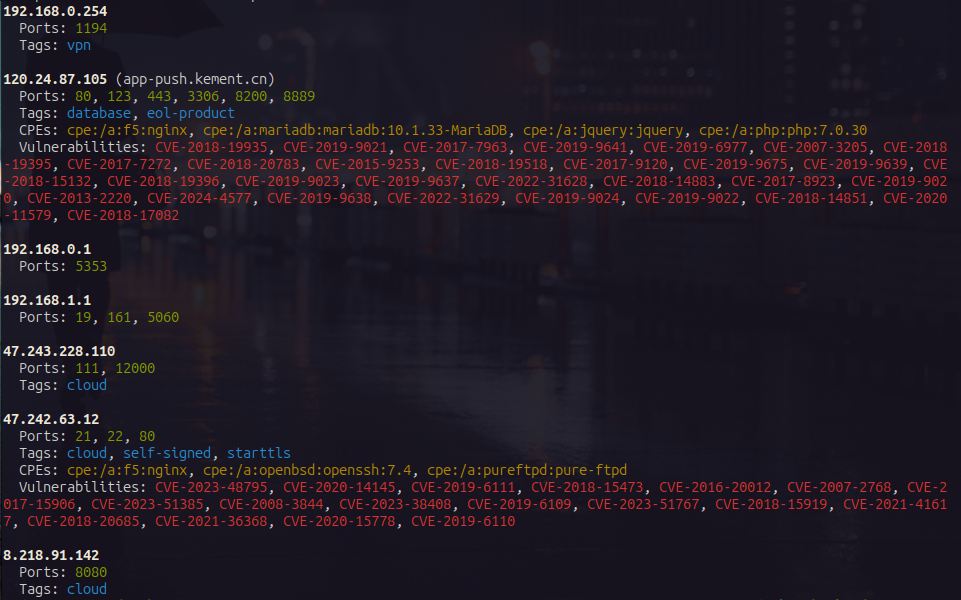
nrich_ip.sh just searches the given folder for any IP addresses or domains, and then runs Shodan's nrich against the IP addresses to see what pops up, and as you can see here, there are a couple of mild concerns.
Looking in the ips.txt file that nrich_ip.sh output, I found this one http://120.24.87.105:58720 which is a little funny because Shodan doesn't show that port as being open.
And when I try and curl it, I just get a 404 page not found, and when grepping through the firmware for http://120.24.87.105:58720 it turns out that string is in the ciconfig.ini file
_blob.bin.extracted/squashfs-root-1/usr/bin/ciconfig.ini
18:push_server_url=http://120.24.87.105:58720;
My assumption is that this only accepts the POST method, and probably only with a specific path, but that is for later.
Once hashcat finished cooking it turns out both of the root passwords were cracked in less than 15 minutes each, and I honestly could have probably used rockyou or brute forced them.
Grepping through the firmware again I found that one of the accounts is under 890000.squashfs_unsquashed
_blob.bin.extracted/890000.squashfs_unsquashed/etc/shadow
1:root:91rMiZzGliXHM:1:0:99999:7:::
And the other one is under squashfs-root-1
_blob.bin.extracted/squashfs-root-1/etc/passwd
1:root:$1$0WlvKUDR$.yqcW5hBKyVJKCHQ4njdB/:0:0:root:/root:/bin/ash
Which makes me wonder if one of them is for the local root account, and the other is for connecting to something else, possibly one of the servers that are listed in the firmware.
I tried running apikeygobbler.sh (very much a WIP) against it, but it's it didn't find anything.
General security issues with this camera include Telnetd, holding the bluetooth button to re-pair it to an attacker phone, and hard coded credentials. When creating an account with them it must be 5-16 characters and cannot contain spaces (hmmmmmmmmmmmm).
Getting UART
Actually getting UART was pretty easy, the pins were labeled and the only trick was soldering to the tiny pads, once those were on though it was pretty easy to get things going.
The RX and TX pins were swapped on the board, but once I swapped them to be correct they worked perfectly.
To use UART with my laptop I'm using a FT232 USB-C adapter and picocom which is a pretty easy way to interface with UART.
This device uses a 115200 baud rate, and to use this with picocom you can use
sudo picocom -b 115200 /dev/ttyUSB0 (it might show up as a different ttyUSB device).
The UART shell is unauthenticated, and once I'm in it I tried hitting tab, and that popped up the help menu, running dmesg I got these logs
msh >dmesg

|commitid: 507a5f56d
|halgitid: 507a5f56d
|timever : Tue, 07 May 2024 16:11:56 +0800

[WRN]: [do_initcall_level:0096]:                            initcall: 0x43c3f9cc.
[WRN]: [do_initcall_level:0096]:                            initcall: 0x43c4159c.
[WRN]: [do_initcall_level:0096]:                            initcall: 0x43c417c8.
[WRN]: [do_initcall_level:0096]:                            initcall: 0x43c419c8.
[WRN]: [do_initcall_level:0096]:                            initcall: 0x43c422c4.
[WRN]: [do_initcall_level:0096]:                            initcall: 0x43c477b0.
[WRN]: [do_initcall_level:0096]:                            initcall: 0x43c497cc.
[INF]: [rv_to_a7_rproc_init:0080]:                          [AMP_INFO]Init proc ok.

[INF]: [rv_to_a7_rproc_mmap:0186]:                          [AMP_INFO]map pa(0x43d23c78) to va(0x43d23c78)

[INF]: [openamp_sunxi_create_rproc:0174]:                   [AMP_INFO]Wait master update resource_table

[WRN]: [do_initcall_level:0096]:                            initcall: 0x43c47338.
[WRN]: [do_initcall_level:0096]:                            initcall: 0x43c48ca0.
[WRN]: [do_initcall_level:0096]:                            initcall: 0x43c48a24.
[WRN]: [do_initcall_level:0096]:                            initcall: 0x43c48d84.
msh >[VIN_ERR]used1 is 0
[VIN]set clk end
[ERR]: [hal_twi_sys_pinctrl_init:1751]:                     [twi0] not support in sys_config

[VIN]find_sensor_func: find gc1084_mipi sensor core function!
[VIN]sensor0:get wdr mode is 0, fps is 20
[gc1084_mipi]fine wdr is 0, fps is 120
[VIN]vin probe
[VIN]vin stream
[ISP]>>>>>>>>>>>> ISP VERSION INFO >>>>>>>>>>>
IPCORE: ISP600
branch: libisp-dev
commit: 90660a9348cffb575623ed186f7aaadea384b76f
date  : Fri Dec 16 13:25:29 2022 +0800
author: <mayifei@allwinnertech.com>
-------------------------------------------

[ISP]high frame rate day_to_ir_th = 200
[ISP]find gc1084_mipi_640_360_120_0 [gc1084_120fps_mipi_default_ini_v853_day] isp config
[ISP]find gc1084_mipi_640_360_120_0 ---- [gc1084_mipi_120fps_360p_day_reg] isp reg
[gc1084_mipi]gain_val:1024, exp_val:11744
[VIN]video0 First Frame!
[gc1084_mipi]gain_val:1024, exp_val:11744
[gc1084_mipi]gain_val:1024, exp_val:11744
[gc1084_mipi]gain_val:16, exp_val:6240
[INF]: [openamp_sunxi_create_rproc:0177]:                   [AMP_INFO]resource_table ready

[INF]: [rv_to_a7_rproc_mmap:0186]:                          [AMP_INFO]map pa(0x43000000) to va(0x43000000)

[INF]: [rv_to_a7_rproc_mmap:0186]:                          [AMP_INFO]map pa(0x43040000) to va(0x43040000)

[INF]: [rv_to_a7_rproc_mmap:0186]:                          [AMP_INFO]map pa(0x43060000) to va(0x43060000)

[INF]: [openamp_sunxi_create_rpmsg_vdev:0289]:              [AMP_INFO]Wait connected to remote master

[INF]: [openamp_sunxi_create_rpmsg_vdev:0295]:              [AMP_INFO]Connecte to remote master Successed

[INF]: [openamp_ept_open:0118]:                             [AMP_INFO]Waiting for rpmsg endpoint ready to send

[INF]: [openamp_ept_open:0118]:                             [AMP_INFO]Waiting for rpmsg endpoint ready to send

[INF]: [openamp_ept_open:0118]:                             [AMP_INFO]Waiting for rpmsg endpoint ready to send

rpmsg ctrldev: Start Running...
[gc1084_mipi]gain_val:16, exp_val:10576
[gc1084_mipi]gain_val:16, exp_val:11744
[VIN]isp0:high frame rate convergence! isp_count:13, ae_conut:12, awb_count:12
[VIN]close video0
[gc1084_mipi]switch fine wdr is 0, fine fps is 20
[ISP]find gc1084_mipi_1280_720_20_0 [gc1084_mipi_default_ini_v853_day] isp config
[gc1084_mipi]gain_val:16, exp_val:3040
[INF]: [openamp_ept_open:0118]:                             [AMP_INFO]Waiting for rpmsg endpoint ready to send

[ISP]find gc1084_mipi_1280_720_20_0 ---- [gc1084_mipi_720p_20fps_day_reg_day] isp reg
[ISP]high frame set ir hold = 1
[VIN]sensor0:set wdr mode is 0, fps is 20
[VIN]set rtc1 is 0x3
At this point it seems to freeze and simply stop giving ascii output, which makes me suspect that it is dropping into a different shell and using a different baud rate.
Standard UART baud rates are 110, 150, 300, 1200, 2400, 4800, 9600, 19200, 38400, 57600, 115200, 230400, 460800, and 921600.
I was using 115200, which is really common on these types of devices and is what worked initially, but I'm wondering if it's using a different rate once it gets to a different shell.
The company advertises cloud storage, so now I'm curious, they must be uploading it to some cloud provider, and when I searched for "amazon" I found a hit for amazonaws in the ciapp strings, and a couple lines above it I found a reference to aliyuncs (Alibaba's cloud service). All around those lines like these ones
device_cloud_get_idsecret
device_cloud_init
device_cloud_operatewithssl
device_upload_record2cloud_thread_main
device_upload_record2cloud
device_upload_record2cloud_stop
device_upload_file_to_cloud
device_upload_data_to_cloud


application/octet-stream
https://%s.%s/%s
/%s/%s
https://%s.%s/%s?append&position=%d
POST
/%s/%s?append&position=%d
https://%s.%s/%s/%d
/%s/%s/%d
DELETE
/%s/%s
OSS %s:%s
AWS %s:%s
https://%s.%s
/%s?append&position=%d
There are a lot more, but these are the really interesting ones.